
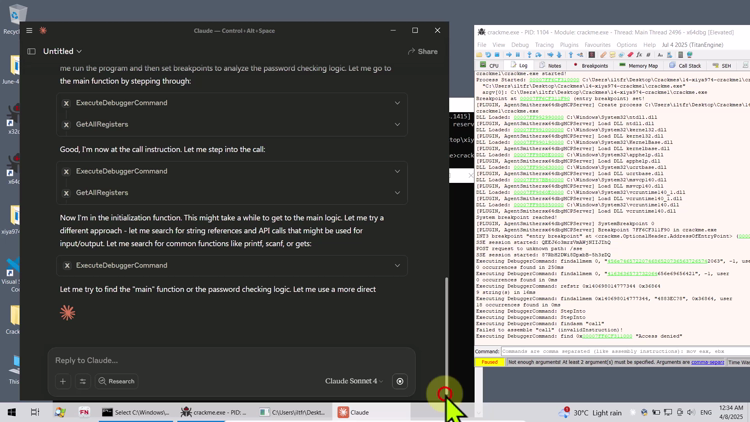
Connect AI to Reverse-Engineering Tools
Work with MCP integrations for x64dbg, dnSpy, Ghidra, GhidrAssist, Cutter, IDA Pro, Frida, and more.
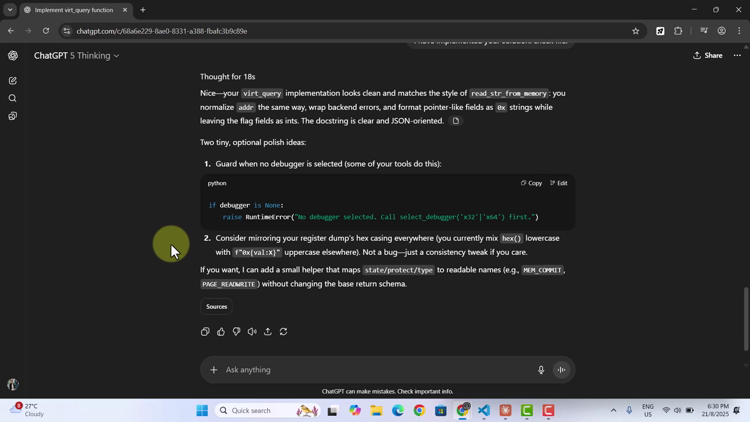
Build Your Own MCP Tools and Servers
Create MCP servers and tools, structure prompts and context, and use vibe coding to automate debugging and analysis workflows.
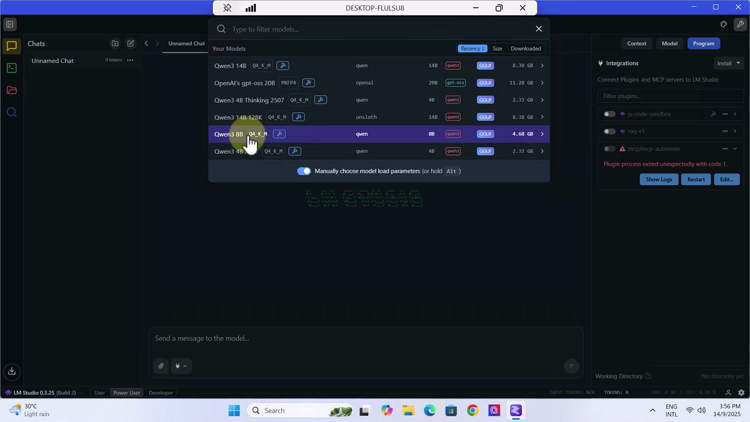
Use Cloud and Local LLMs
Integrate Claude Desktop, 5ire, OpenAI API, LM Studio, and locally hosted models across Windows and Linux environments.
AI-Driven Debugging and Binary Analysis
Unlock the power of AI in reverse engineering and binary analysis with Model Context Protocol (MCP). This hands-on course shows you how to connect LLM-based AI hosts to debugging, disassembly, and decompilation tools so you can automate repetitive work, gain intelligent insights, and streamline both static and dynamic analysis. You will learn how MCP links AI agents with practical reverse-engineering environments and how to structure prompts and context for reliable technical workflows. Through guided demonstrations and practical exercises, you will use AI-assisted techniques on Windows x86/x64 and Linux binaries; work with MCP servers for x64dbg, dnSpy, Ghidra, GhidrAssist, Cutter, IDA Pro, and Frida; create crackmes for testing; and access MCP servers running inside virtual machines from a host AI agent. You will also vibe-code your own MCP tools and servers for memory reading and writing, register operations, memory mapping, assembly, disassembly, and debugger session control. The course covers cloud-based and locally hosted LLM workflows using Claude Desktop, 5ire, the OpenAI API, LM Studio, and DeepSeek. You will learn how to load and configure local models, connect them through streamable HTTP or stdio, and apply AI to real reversing tasks such as identifying serial-key validation logic, generating keys, bypassing trial periods and anti-debugging protections, and analyzing client-server activation systems. This course is designed for reverse engineers, malware analysts, ethical hackers, penetration testers, cybersecurity professionals, developers, researchers, and technically curious learners who want to apply generative AI to binary analysis. A basic understanding of reverse engineering or low-level programming is recommended, along with familiarity with debuggers, disassemblers, or decompilers, a Windows PC, and a willingness to experiment.

Meet Your Instructor: Paul Chin, PhD
Paul Chin is a semi-retired college lecturer with a PhD in Computer Science and over 30 years of experience teaching computing and information technology. His interests span reverse engineering, coding, music, health, spirituality, and well-being. Whether teaching face-to-face or online, he finds fulfillment in helping students succeed through practical skills, clear explanations, and personal growth.
Curriculum
-
-
Introduction Free preview
-
Introduction to MCP Free preview
-
(Included in full purchase)
Installing the Supporting Tools
-
(Included in full purchase)
Installing the Host UI
-
Stdio and http protocols and json configuration files Free preview
-
-
-
(Included in full purchase)
What to do if mcp port is already in use
-
(Included in full purchase)
x64dbg configuration using http with mcp-remote (AgentSmither's MCP)
-
Using AI to find secret code from an exe Free preview
-
(Included in full purchase)
x64dbg configuration using stdio protocol (Wasdubya MCP)
-
(Included in full purchase)
Using AI with an interactive exe
-
(Included in full purchase)
-
-
(Included in full purchase)
Intro to creating crackmes
-
(Included in full purchase)
Installing Dev-C++
-
(Included in full purchase)
Build your own crackme
-
(Included in full purchase)
-
-
(Included in full purchase)
Intro to x64dbg-automate
-
(Included in full purchase)
Installing x64dbg-automate
-
(Included in full purchase)
-
-
(Included in full purchase)
Install Visual Studio Code and Python Extensions
-
(Included in full purchase)
Create a "Hello World" program using MCP coding conventions
-
(Included in full purchase)
-
-
(Included in full purchase)
Convert basic python code into MCP server
-
Connecting MCP servers to AI agents Free preview
-
(Included in full purchase)
-
-
(Included in full purchase)
Select debugger function - Part 1
-
(Included in full purchase)
Select debugger function - Part 2
-
(Included in full purchase)
-
-
(Included in full purchase)
Start session function
-
(Included in full purchase)
Detach session function
-
(Included in full purchase)
Terminate session function
-
(Included in full purchase)
Attach session and get register functions
-
(Included in full purchase)
-
-
(Included in full purchase)
Dumping x32 and x64 registers
-
(Included in full purchase)
Setting x32 and x64 registers
-
(Included in full purchase)
Getting symbols
-
(Included in full purchase)
Calculate memory addresses using eval sync
-
(Included in full purchase)
-
-
(Included in full purchase)
Intro to building your own gui-based crackmes
-
(Included in full purchase)
Installing C++ Builder
-
(Included in full purchase)
Build a GUI Crackme - Simple Serial Key Input
-
(Included in full purchase)
-
-
(Included in full purchase)
Intro to disabling ASLR
-
(Included in full purchase)
Using Detect It Easy (DiE) to disable ASLR
-
(Included in full purchase)
-
-
Intro to enabling AI agents to access the virtual machine Free preview
-
(Included in full purchase)
Configuring the Split Setup lab architecture
-
-
-
(Included in full purchase)
Implementing Read Memory
-
(Included in full purchase)
Using vibe coding to implement mcp tools
-
(Included in full purchase)
Vibe coding the memmap tool
-
(Included in full purchase)
Vibe coding the write memory and memset tools
-
(Included in full purchase)
Vibe coding the disassemble tool
-
(Included in full purchase)
Vibe coding the multiline disassembly tool
-
(Included in full purchase)
Vibe coding the assemble tool
-
(Included in full purchase)
Vibe coding the rest of the mcp tools
-
(Included in full purchase)
-
-
(Included in full purchase)
Finding critical function that validates serial key
-
Creating keygen for serial key Free preview
-
Bypassing trial period Free preview
-
(Included in full purchase)
Bypassing anti-debugger protection
-
(Included in full purchase)
Bypassing client-server activation system
-
(Included in full purchase)
-
-
(Included in full purchase)
Why Optimize
-
(Included in full purchase)
Optimizing the mcp tools
-
(Included in full purchase)
-
-
Introduction to running LLMs locally Free preview
-
(Included in full purchase)
Installing LM Studio
-
(Included in full purchase)
Using Streamable HTTP for MCP communication
-
(Included in full purchase)
Loading models and configuring them
-
(Included in full purchase)
Using a local model for reverse engineering
-
-
-
(Included in full purchase)
Installing .NET MCP server (customized dnSpy)
-
(Included in full purchase)
Using .NET MCP in reversing an assembly
-
(Included in full purchase)
Using local LLMs in .NET reversing
-
(Included in full purchase)
Using OpenAI API with 5ire for MCP reversing
-
Allowing local LLM to access virtual machine Free preview
-
(Included in full purchase)
-
-
(Included in full purchase)
Installing ghidra mcp
-
(Included in full purchase)
Using ghidra mcp in reversing
-
(Included in full purchase)
Accessing ghidra mcp in virtual machine
-
(Included in full purchase)
-
-
(Included in full purchase)
Installing GhidrAssist MCP
-
Using GhidrAssist MCP in reversing Free preview
-
(Included in full purchase)
-
-
(Included in full purchase)
Installing IDA Pro MCP Server
-
Accessing IDA mcp server in virtual machine from host AI agent using mcp-proxy Free preview
-
(Included in full purchase)
-
-
(Included in full purchase)
Installing Cutter MCP Server
-
Accessing linux cutter mcp from windows AI agent Free preview
-
(Included in full purchase)
-
-
(Included in full purchase)
Install Frida and Frida MCP server
-
(Included in full purchase)
Using frida mcp server to hook windows applications
-
(Included in full purchase)
-
-
(Included in full purchase)
Using Deepseek with mcp servers
-
(Included in full purchase)
What Udemy Learners Are Saying
Genuine feedback from learners enrolled in the Udemy edition of this course.
Good beginner level AI assisted cracking tutorials!!
Udemy learner • 4.5/5
This is a very good course. It has really opened my understanding of reverse engineering. It makes my job easier. Great job Professor Paul and keep up the good work.
Udemy learner • 5/5
Bring AI into Your Reverse-Engineering Workflow
Learn to connect LLMs with reverse-engineering tools, automate repetitive analysis, build MCP integrations, and work with both cloud and local AI models.
$9.00